Step 6. Count to Infinity Problem (Two-node Loop Instability)
Introduction
In the previous steps, we’ve explored how RIP builds and maintains routing tables in both stable networks and during topology changes. Now, we’ll examine one of the most significant challenges of distance-vector routing protocols like RIP: the count-to-infinity problem.
The count-to-infinity problem is a fundamental issue in distance-vector routing that can occur when network topology changes, particularly when links fail. It can lead to routing loops, slow convergence, and temporary network unreachability. Understanding this problem and its solutions is crucial for anyone working with RIP or similar protocols.
Goals
In this step, our goals are to:
Understand the count-to-infinity problem and why it occurs in distance-vector routing
Observe how the problem manifests in a simple two-router network
Explore different solutions to the problem, including split horizon and poison reverse
Understand the limitations of these solutions
Understanding the Count-to-Infinity Problem
The count-to-infinity problem occurs when routers continue to increment metrics for routes that are no longer valid, potentially counting up to “infinity” (which is 16 in RIP) before the routes are removed.
Here’s how it typically happens:
Router A and Router B both have routes to Network X
Router A’s route to Network X fails
Router B still has its route to Network X (possibly through Router A)
Router B advertises this route to Router A
Router A accepts this route, increments the metric, and adds it to its routing table
Router A then advertises this route back to Router B
Router B sees a higher metric but still updates its route
This cycle continues, with metrics incrementing until they reach “infinity”
During this process, packets may loop between routers, and the network takes a long time to converge to a stable state where the invalid routes are removed.
Network Configuration
For this step, we use a simpler network topology defined in RipNetworkB.ned.
This network consists of two routers connected directly to each other, with each
router also connected to a LAN switch with several hosts:
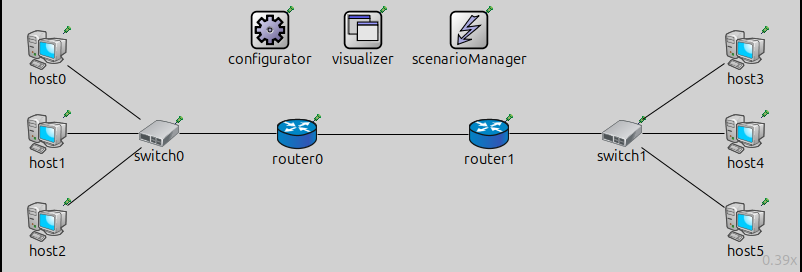
This simplified topology allows us to clearly observe the count-to-infinity problem between just two routers.
The configuration in omnetpp.ini is the following:
[Config Step6]
description = "Count to infinity (two-node loop instability)"
network = RipNetworkB
sim-time-limit = 500s

# adding default routes in all hosts
*.configurator.config = xml("<config> \
                                <interface hosts='**' address='10.x.x.x' netmask='255.x.x.x'/> \
                                <autoroute sourceHosts='host*'/> \
                             </config>")

*.configurator.addStaticRoutes = true

# RIP parameters on routers
*.router*.hasRip = true
*.router*.rip.startupTime = uniform(0s,1s)
# disable advanced features for now!
*.router*.rip.ripConfig = xml("<config> <interface hosts='router*' mode='NoSplitHorizon' /> </config>")
*.router*.rip.triggeredUpdate = false

*.scenarioManager.script = xml("<scenario> \
                                    <disconnect t='50' src-module='router1' dest-module='switch1' /> \
                                </scenario>")

# Visualizer settings
*.visualizer.interfaceTableVisualizer[0].displayInterfaceTables = true

*.visualizer.routingTableVisualizer[*].nodeFilter = "router* or host0 or host3"
*.visualizer.routingTableVisualizer[0].destinationFilter = "host0"
*.visualizer.routingTableVisualizer[1].destinationFilter = "host3"

# enable ping app to see ping packets bouncing back and forth between the two routers

## Application parameters
#*.host0.numApps = 1
#*.host0.app[0].typename = "PingApp"
#*.host0.app[0].destAddr = "host3"
#*.host0.app[0].startTime = 35s
#*.host0.app[0].sendInterval = 15s
#*.host0.app[0].hopLimit = 8
#
#*.visualizer.packetDropVisualizer[0].displayPacketDrops = true

**.arp.typename = "GlobalArp"
Key aspects of this configuration:
Split horizon is disabled (
mode='NoSplitHorizon')Triggered updates are disabled
A scenario manager script disconnects the link between
router1andswitch1at t=50s
Experiment 1: Demonstrating the Count-to-Infinity Problem
In our first experiment ([Config Step6]), we demonstrate the basic
count-to-infinity problem. When the link between router1 and switch1
breaks at t=50s, the following sequence of events occurs:
router1loses direct connectivity to hosts 3, 4, and 5router0still has a route to these hosts (throughrouter1)router0advertises this route torouter1router1accepts this route, increments the hop count, and adds it to its routing tablerouter1then advertises this route back torouter0This cycle continues, with hop counts incrementing with each exchange
The result is that convergence takes approximately 220 seconds (from the link break at t=50s to the removal of invalid routes at t=270s). During this time, the hop count for routes to hosts 3, 4, and 5 gradually increases until it reaches 16, at which point the routes are considered unreachable.
You can also observe how ping packets from host0 to host3 bounce back
and forth between the two routers, indicating the presence of a routing loop.
The ping packets eventually time out after 8 hops and are dropped.
Experiment 2: Count-to-Infinity as a Race Condition
Interestingly, the count-to-infinity problem doesn’t always occur, even with the
same network topology. In [Config Step6DifferentTimings], we demonstrate
that the problem can be avoided depending on the timing of router updates:
[Config Step6DifferentTimings]
extends = Step6
description = "Count to infinity: Using different timers, the problem does not surface"
sim-time-limit = 200s

*.router1.rip.startupTime = 0.5s
*.router0.rip.startupTime = 1s
In this configuration, we set different startup times for the routers:
router1starts RIP at t=0.5srouter0starts RIP at t=1s
With this timing, router1 sends its update first after the link failure,
informing router0 that the routes are no longer available before router0
has a chance to advertise its outdated routes back to router1. This prevents
the count-to-infinity problem from occurring.
This demonstrates that the count-to-infinity problem is essentially a race condition - it depends on which router sends its updates first after a topology change.
Note
One might think that triggered updates would help solve the count-to-infinity problem by speeding up convergence. However, it can actually make the count-to-infinity problem worse by accelerating the rate at which incorrect routing information propagates. The network still experiences routing loops and slow convergence.
Solution 1: Split Horizon
One effective solution to the count-to-infinity problem is split horizon. In
[Config Step6Solution1], we demonstrate how split horizon prevents the
problem:
[Config Step6Solution1]
extends = Step6
description = "Solution to count to infinity problem: Split horizon"
sim-time-limit = 200s

*.router*.rip.ripConfig = xml("<config> <interface hosts='router*' mode='SplitHorizon' /> </config>")
Split horizon is a simple rule: a router will not advertise routes back to the neighbor from which it learned them. This prevents the feedback loop that causes the count-to-infinity problem.
With split horizon enabled:
When
router1loses its direct connection to hosts 3, 4, and 5router0still has routes to these hosts (throughrouter1)However, due to split horizon,
router0will not advertise these routes back torouter1This breaks the feedback loop and prevents the count-to-infinity problem
Split horizon is particularly effective in simple topologies like our two-router network, where it completely prevents the count-to-infinity problem.
Solution 2: Split Horizon with Poison Reverse
An even stronger solution is split horizon with poison reverse, demonstrated in [Config Step6Solution2]:
[Config Step6Solution2]
extends = Step6
description = "Solution to count to infinity problem: Split horizon with poison reverse"
sim-time-limit = 200s

*.router*.rip.ripConfig = xml("<config> <interface hosts='router*' mode='SplitHorizonPoisonedReverse' /> </config>")
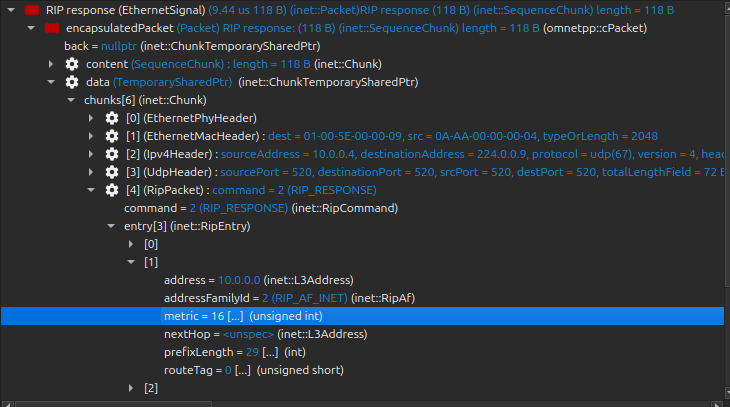
With poison reverse, a router not only follows the split horizon rule but also actively advertises routes learned from a neighbor back to that neighbor with a metric of 16 (infinity). This explicitly tells the neighbor not to use these routes.
For example:
router0learns routes to hosts 3, 4, and 5 fromrouter1With poison reverse,
router0advertises these routes back torouter1with a metric of 16This ensures that
router1will never userouter0as a path to these hosts
Poison reverse provides an extra layer of protection against routing loops, though it does increase the size of routing updates.
Limitations of These Solutions
While split horizon and poison reverse are effective in simple topologies like our two-router network, they have limitations:
They don’t completely solve the count-to-infinity problem in networks with more than two routers (which we’ll explore in Step 7)
They increase the size of routing updates, especially poison reverse
They can slow down convergence in certain scenarios
Despite these limitations, split horizon and poison reverse are widely used in RIP implementations as they significantly reduce the likelihood and impact of the count-to-infinity problem.
Conclusion and Next Steps
In this step, we’ve explored the count-to-infinity problem in a simple two-router network and examined several solutions, including split horizon and poison reverse. We’ve seen how these techniques can prevent routing loops and improve convergence time after topology changes.
However, these solutions have limitations, particularly in more complex network topologies. In the next step, we’ll explore the count-to-infinity problem in a network with more than two routers, where split horizon and poison reverse are not completely effective.
Sources:
omnetpp.ini,
RipNetworkB.ned
Discussion
Use this page in the GitHub issue tracker for commenting on this tutorial.