Step 17b. Make R3 an ABR - create a virtual link between R1 and R3
Goals
The goal of this step is to demonstrate the use of OSPF virtual links to logically connect an area to the backbone.
A virtual link is a logical connection through a transit area that allows two ABRs to appear directly connected in Area 0. Virtual links are used when:
An area cannot be physically connected to the backbone
The backbone itself is partitioned and needs to be reconnected
Configuration
This configuration is based on Step 17. A virtual Link is configured between R1 and R3 through a transit area.
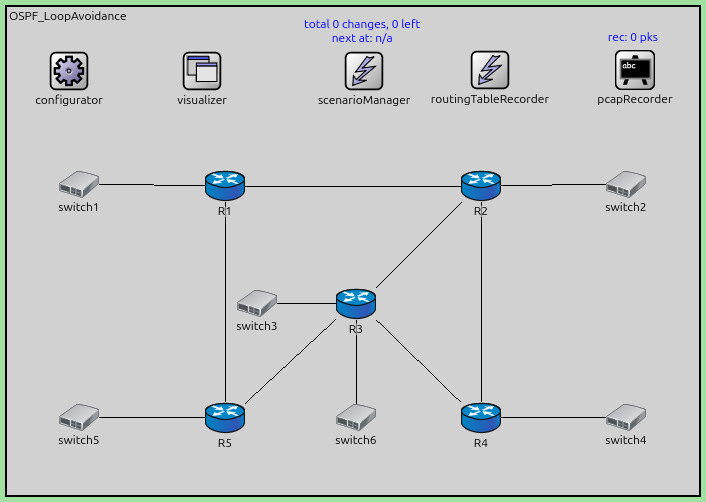
The configuration in omnetpp.ini is the following:
[Config Step17b]
description = "Make R3 an ABR - create a vitual link between R1 and R3"
extends = Step17

*.R*.ospf.ospfConfig = xmldoc("ASConfig_Area_Loop_ABR_Virtual.xml")
The OSPF configuration:
<?xml version="1.0"?>
<OSPFASConfig xmlns:xsi="http://www.w3.org/2001/XMLSchema-instance" xsi:schemaLocation="OSPF.xsd">

  <!-- Areas -->
  <Area id="0.0.0.0">
    <AddressRange address="R1>R2" mask="R1>R2" />
    <AddressRange address="R2>R1" mask="R2>R1" />
  </Area>

  <Area id="0.0.0.1">
    <AddressRange address="R1>R5" mask="R1>R5" />
    <AddressRange address="R1>switch1" mask="R1>switch1" />

    <AddressRange address="R5>R1" mask="R5>R1" />
    <AddressRange address="R5>R3" mask="R5>R3" />
    <AddressRange address="R5>switch5" mask="R5>switch5" />

    <AddressRange address="R3>R5" mask="R3>R5" />
    <AddressRange address="R3>switch3" mask="R3>switch3" />
  </Area>

  <Area id="0.0.0.2">
    <AddressRange address="R2>switch2" mask="R2>switch2" />
    <AddressRange address="R2>R4" mask="R2>R4" />
    <AddressRange address="R2>R3" mask="R2>R3" />

    <AddressRange address="R4>switch4" mask="R4>switch4" />
    <AddressRange address="R4>R2" mask="R4>R2" />
    <AddressRange address="R4>R3" mask="R4>R3" />

    <AddressRange address="R3>R2" mask="R3>R2" />
    <AddressRange address="R3>R4" mask="R3>R4" />
    <AddressRange address="R3>switch6" mask="R3>switch6" />
  </Area>

  <!-- Routers -->
  <Router name="R1" RFC1583Compatible="true">
    <BroadcastInterface ifName="eth0" areaID="0.0.0.1" interfaceMode="Passive" />
    <BroadcastInterface ifName="eth1" areaID="0.0.0.1" />
    <BroadcastInterface ifName="eth2" areaID="0.0.0.0" />
    <VirtualLink endPointRouterID="R3%routerId" transitAreaID="0.0.0.1" />
  </Router>

  <Router name="R2" RFC1583Compatible="true">
    <BroadcastInterface ifName="eth1" areaID="0.0.0.2" interfaceMode="Passive" />
    <BroadcastInterface ifName="eth0" areaID="0.0.0.2" />
    <BroadcastInterface ifName="eth2" areaID="0.0.0.2" />
    <BroadcastInterface ifName="eth3" areaID="0.0.0.0" />
  </Router>

  <Router name="R3" RFC1583Compatible="true">
    <BroadcastInterface ifName="eth0" areaID="0.0.0.2" />
    <BroadcastInterface ifName="eth1" areaID="0.0.0.2" />
    <BroadcastInterface ifName="eth2" areaID="0.0.0.1" />
    <BroadcastInterface ifName="eth3" areaID="0.0.0.1" interfaceMode="Passive" />
    <BroadcastInterface ifName="eth4" areaID="0.0.0.2" interfaceMode="Passive" />
    <VirtualLink endPointRouterID="R1%routerId" transitAreaID="0.0.0.1" />
  </Router>

  <Router name="R4" RFC1583Compatible="true">
    <BroadcastInterface ifName="eth0" areaID="0.0.0.2" />
    <BroadcastInterface ifName="eth1" areaID="0.0.0.2" />
    <BroadcastInterface ifName="eth2" areaID="0.0.0.2" interfaceMode="Passive" />
  </Router>

  <Router name="R5" RFC1583Compatible="true">
    <BroadcastInterface ifName="eth0" areaID="0.0.0.1" interfaceMode="Passive" />
    <BroadcastInterface ifName="eth1" areaID="0.0.0.1" />
    <BroadcastInterface ifName="eth2" areaID="0.0.0.1" />
  </Router>

</OSPFASConfig>
Results
With the virtual link configured:
R1 and R3 establish a virtual adjacency through the transit area.
The virtual link is treated as part of Area 0 (the backbone).
Inter-area routing works correctly as if the areas were physically connected to the backbone.
The routing tables show improved connectivity compared to Step 17.
Virtual links provide flexibility in network design but should be used sparingly as they add complexity and can make troubleshooting more difficult.
Sources:
omnetpp.ini,
OSPF_LoopAvoidance.ned,
ASConfig_Area_Loop_ABR_Virtual.xml
Discussion
Use this page in the GitHub issue tracker for commenting on this tutorial.