Step 15. Set advertisement of a network to ‘false’
Goals
The goal of this step is to demonstrate how to suppress the advertisement of a
network using the advertise="false" attribute in the OSPF configuration.
By default, OSPF routers advertise all networks configured in their areas. However,
in some scenarios, you may want to prevent a specific network from being advertised
to other areas. This can be achieved by setting the advertise attribute to
false for a specific AddressRange in the OSPF area configuration. When this
is set, the ABR will not generate a Summary LSA for that network, effectively hiding
it from routers in other areas.
Configuration
This configuration is based on step 14. The only change is in the OSPF configuration
file, where the network connected to R5’s eth0 interface (192.168.22.0/30, which
includes host3) is configured with advertise="false".
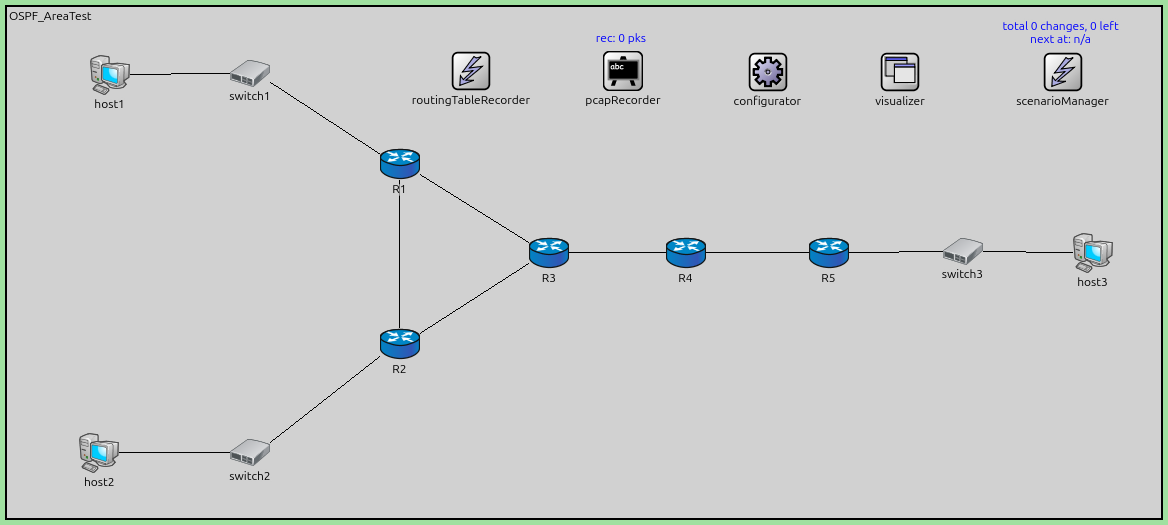
The configuration in omnetpp.ini is the following:
[Config Step15]
description = "Set advertisement of a network to 'false'"
extends = Step14

*.R*.ospf.ospfConfig = xmldoc("ASConfig_Area_NoAdvertisement.xml")

# application parameters
*.host1.numApps = 1
*.host1.app[0].typename = "PingApp"
*.host1.app[0].destAddr = "host2"
*.host1.app[0].startTime = 60s
The OSPF configuration shows the advertise="false" attribute on line 27:
<?xml version="1.0"?>
<OSPFASConfig xmlns:xsi="http://www.w3.org/2001/XMLSchema-instance" xsi:schemaLocation="OSPF.xsd">

  <!-- Areas -->
  <Area id="0.0.0.0">
    <AddressRange address="R3>R4" mask="R3>R4" />
    <AddressRange address="R4>R3" mask="R4>R3" />
  </Area>

  <Area id="0.0.0.1">
    <AddressRange address="R1>switch1" mask="R1>switch1" />
    <AddressRange address="R1>R2" mask="R1>R2" />
    <AddressRange address="R1>R3" mask="R1>R3" />

    <AddressRange address="R2>switch2" mask="R2>switch2" />
    <AddressRange address="R2>R1" mask="R2>R1" />
    <AddressRange address="R2>R3" mask="R2>R3" />

    <AddressRange address="R3>R1" mask="R3>R1" />
    <AddressRange address="R3>R2" mask="R3>R2" />
  </Area>

  <Area id="0.0.0.2">
    <AddressRange address="R4>R5" mask="R4>R5" />

    <AddressRange address="R5>R4" mask="R5>R4" />
    <AddressRange address="R5>switch3" mask="R5>switch3" advertise="false" />
  </Area>

  <!-- Routers -->
  <Router name="R1" RFC1583Compatible="true">
    <BroadcastInterface ifName="eth0" areaID="0.0.0.1" interfaceMode="Passive" />
    <PointToPointInterface ifName="ppp0" areaID="0.0.0.1" />
    <PointToPointInterface ifName="ppp1" areaID="0.0.0.1" />
  </Router>

  <Router name="R2" RFC1583Compatible="true">
    <BroadcastInterface ifName="eth0" areaID="0.0.0.1" interfaceMode="Passive" />
    <PointToPointInterface ifName="ppp0" areaID="0.0.0.1" />
    <PointToPointInterface ifName="ppp1" areaID="0.0.0.1" />
  </Router>

  <Router name="R3" RFC1583Compatible="true">
    <PointToPointInterface ifName="ppp0" areaID="0.0.0.1" />
    <PointToPointInterface ifName="ppp1" areaID="0.0.0.1" />
    <PointToPointInterface ifName="ppp2" areaID="0.0.0.0" />
  </Router>

  <Router name="R4" RFC1583Compatible="true">
    <PointToPointInterface ifName="ppp0" areaID="0.0.0.2" />
    <PointToPointInterface ifName="ppp1" areaID="0.0.0.0" />
  </Router>

  <Router name="R5" RFC1583Compatible="true">
    <BroadcastInterface ifName="eth0" areaID="0.0.0.2" interfaceMode="Passive" />
    <PointToPointInterface ifName="ppp0" areaID="0.0.0.2" />
  </Router>

</OSPFASConfig>
Results
When advertise="false" is set for the R5->switch3 network (192.168.22.0/30):
R5 still learns about this directly connected network and installs it in its own routing table.
R4 (the ABR for Area 0.0.0.2) does not generate a Summary LSA for the 192.168.22.0/30 network to advertise it into Area 0.0.0.0 or into other areas.
As a result, routers in Area 0.0.0.1 (R1, R2, R3) do not learn about the 192.168.22.0/30 network and cannot reach host3.
Routers in Area 0.0.0.1 can still reach the 192.168.22.4/30 network (the R4-R5 link), because that network is still being advertised normally.
Comparing the routing tables from Step 14 and Step 15 confirms that the 192.168.22.0/30 network is absent from routers in Area 0. 0.0.1 in this step, while it was present in Step 14.
This feature is useful when you want to keep certain networks local to an area and prevent them from being visible to the rest of the OSPF domain.
Sources:
omnetpp.ini,
OSPF_AreaTest.ned,
ASConfig_Area_NoAdvertisement.xml
Discussion
Use this page in the GitHub issue tracker for commenting on this tutorial.