Step 25. PCAP recording
Goals
The goal of this step is to demonstrate PCAP recording capabilities for capturing OSPF traffic.
INET’s PCAP recorder module can capture network traffic at specific interfaces and save it in PCAP format, which can later be analyzed with tools like Wireshark. This is useful for:
Debugging OSPF protocol issues
Understanding packet-level protocol behavior
Verifying LSA contents and exchanges
Analyzing timing and sequencing of OSPF messages
Configuration
This configuration is based on Step 1. PCAP recorders are configured on specific interfaces of selected routers.
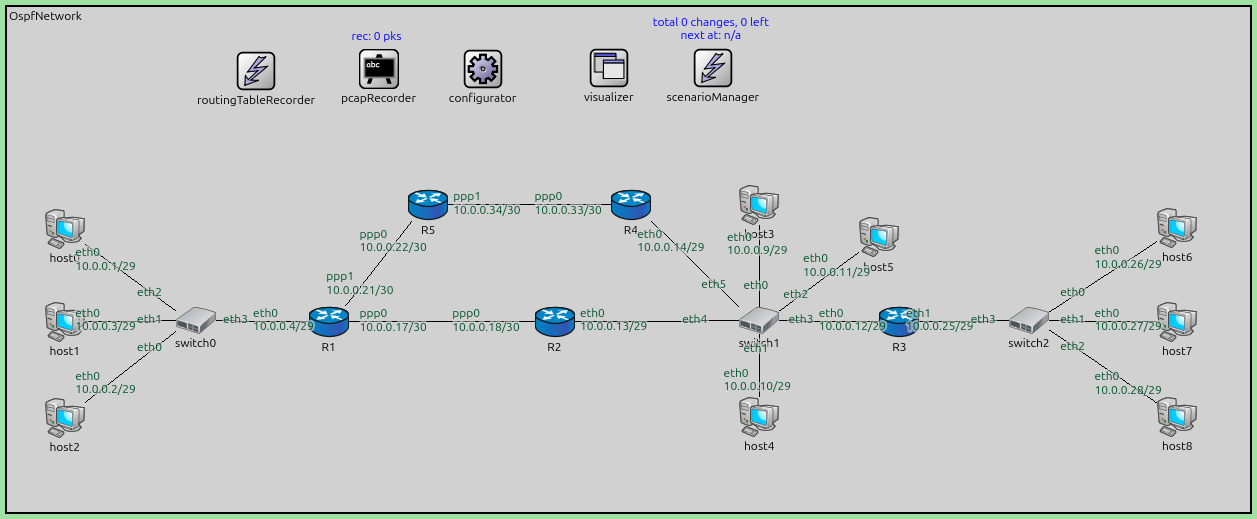
The configuration in omnetpp.ini is the following:
[Config Step25]
description = "PCAP recording"
extends = Step1

**.crcMode = "computed"
**.fcsMode = "computed"

*.R1.numPcapRecorders = 1
*.R1.pcapRecorder[0].moduleNamePatterns = "ppp[0]"
*.R1.pcapRecorder[0].pcapNetwork = 204        # ppp
*.R1.pcapRecorder[0].pcapFile = "results/R1.ppp0.pcap"

*.R5.numPcapRecorders = 1
*.R5.pcapRecorder[0].moduleNamePatterns = "ppp[1]"
*.R5.pcapRecorder[0].pcapNetwork = 204        # ppp
*.R5.pcapRecorder[0].pcapFile = "results/R5.ppp1.pcap"

*.R4.numPcapRecorders = 1
*.R4.pcapRecorder[0].moduleNamePatterns = "eth[0]"
*.R4.pcapRecorder[0].pcapNetwork = 1        # ethernet
*.R4.pcapRecorder[0].pcapFile = "results/R4.eth0.pcap"
Results
With PCAP recording enabled:
PCAP recorder modules capture all traffic on the specified interfaces.
Separate PCAP files are created for each configured interface:
R1.ppp0.pcap - Traffic on R1’s ppp0 interface
R5.ppp1.pcap - Traffic on R5’s ppp1 interface
R4.eth0.pcap - Traffic on R4’s eth0 interface
These PCAP files can be opened in Wireshark to examine:
OSPF Hello packets
Database Description (DBD) packets
Link State Request/Update/Acknowledgment packets
LSA contents (Router LSAs, Network LSAs, Summary LSAs, etc.)
The PCAP files show the timing and sequencing of OSPF protocol messages, useful for understanding adjacency formation, LSDB synchronization, and LSA flooding.
PCAP recording is a powerful tool for learning OSPF protocol details and troubleshooting complex scenarios.
Sources:
omnetpp.ini,
OspfNetwork.ned
Discussion
Use this page in the GitHub issue tracker for commenting on this tutorial.