Step 13. Freshness of a LSA
Goals
The goal of this step is to demonstrate LSA aging and the MaxAge mechanism in OSPF.
Every LSA has an age field that starts at 0 when originated and increments over time (up to MaxAge = 3600 seconds). LSAs are periodically refreshed by their originating router before they reach MaxAge. If a router becomes unreachable and cannot refresh its LSAs, those LSAs age to MaxAge and are then flushed from the LSDB.
When a link or router disappears, the affected router can immediately set the LSA age to MaxAge and flood it, accelerating the removal of stale information from the network.
Configuration
This step uses the Freshness network. The simulation script disconnects a link at t=60s.
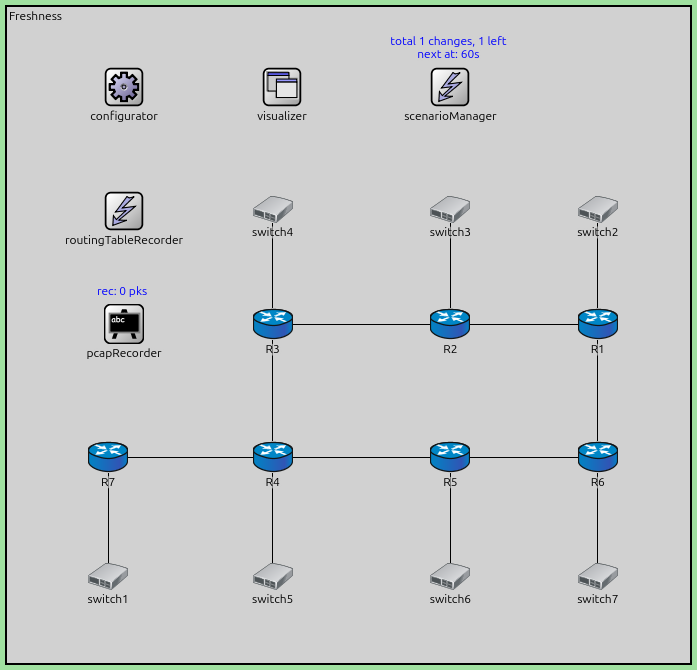
The configuration in omnetpp.ini is the following:
[Config Step13]
description = "Freshness of a LSA"
network = Freshness

*.scenarioManager.script = xml("<scenario> \
                                    <disconnect t='60' src-module='R1' dest-module='switch2' /> \
                                </scenario>")

# application parameters
*.R7.numApps = 1
*.R7.app[0].typename = "PingApp"
*.R7.app[0].destAddr = "R1"
*.R7.app[0].startTime = 60s
Results
The simulation demonstrates LSA aging:
During normal operation, routers periodically refresh their LSAs (every LSRefreshTime, typically 1800 seconds) to prevent them from aging out.
When the link between R1 and switch2 is disconnected at t=60s:
R1 detects the link down event
R1 generates a new Router LSA that no longer includes this link
The old LSA (which included the link) is effectively replaced
The OSPF module logs show LSA age values incrementing over time.
If a router were to fail completely (unable to refresh its LSAs), its LSAs would eventually age to MaxAge (3600s) and be flushed from all routers’ LSDBs.
By flooding an LSA with age=MaxAge, a router can rapidly remove obsolete information from the network rather than waiting for natural aging.
This mechanism ensures that the OSPF database remains current and that stale information is eventually removed even if routers fail silently.
Sources:
omnetpp.ini,
Freshness.ned
Discussion
Use this page in the GitHub issue tracker for commenting on this tutorial.