Step 7. Topology Change with RSTP: Faster Recovery
Goals
This step runs the same switch-failure scenario as Step 5 but with RSTP enabled instead of STP. The goal is to observe the dramatically faster re-convergence that RSTP provides after a topology change.
How RSTP Handles Topology Changes
RSTP reacts to failures fundamentally differently from STP:
Immediate failure detection. Instead of waiting for maxAge (20 s) to
expire, RSTP considers a neighbor lost after missing just 3 consecutive hello
BPDUs (3 × 2 s = 6 s). With direct link failure detection (carrier loss), the
reaction can be even faster — effectively instantaneous.
Alternate port promotion. If the failed port was a Root port, the switch already has an Alternate port standing by — a port that was kept in Discarding state precisely because it offered a second-best path to the root. This port is promoted to Root port immediately, without any election or timer delays.
Rapid designated port activation. If new ports need to become Designated (because the tree shape changed), the proposal/agreement handshake described in Step 6 activates them within one or two hello intervals (2–4 s), without going through the 30 s Listening/Learning cycle.
Fast TC propagation. Unlike STP’s TCN mechanism (described in Step 5), where topology change notifications must travel to the root and back, the detecting switch sets the TC (Topology Change) flag directly in its BPDUs, and this flag is flooded throughout the network. Each switch that receives a TC-flagged BPDU immediately flushes its MAC forwarding table on all ports except the one the BPDU arrived on and any edge ports (rather than merely reducing the aging time). This ensures all switches re-learn the correct forwarding paths within seconds.
Total re-convergence time after a failure with RSTP: approximately 6 s.
Configuration
The Step7 configuration extends Step5 with only one change:
[Config Step7]
description = "Topology change with RSTP - faster recovery"
extends = Step5
network = RstpLargeNet

**.spanningTreeProtocol = "Rstp"
The same LargeNet network and failure.xml script are used. The only
difference is spanningTreeProtocol = "Rstp".
Results
See Step 6 for a summary of the visual cues available in RSTP simulations (packet names, port labels, root path cost, link colors, etc.).
Before failure (t=0-60 s): RSTP converges in ~6 s. All hosts communicate normally. The active tree is identical to the STP case (same root, same paths), but it was established much faster.
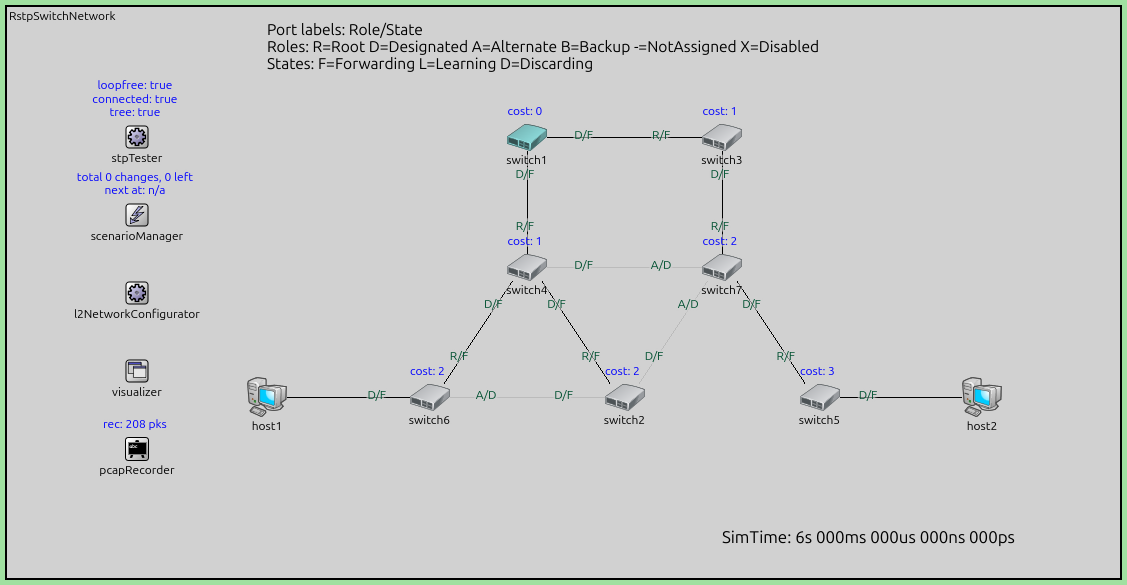
At t=60 s — switch4 shuts down. RSTP detects the failure within one
hello interval (2 s) and immediately promotes alternate ports to root ports.
The tree re-stabilizes in approximately 6 s, compared to ~50 s for STP.
Hosts experience only a brief connectivity interruption.
At t=180 s — switch4 restarts. RSTP’s edge-port detection allows
switch4 to rejoin the tree quickly without going through the long
Listening/Learning cycle.
In the simulation, watch for:
Port role changes on the interfaces of switches neighboring
switch4. Whenswitch4fails, anALTERNATE/DISCARDINGport is promoted toROOT/FORWARDING— this transition is immediate and is the main reason RSTP recovers so fast.“TCN received” bubbles appearing on switches as the TC flag propagates through the network, triggering MAC table flushes.
Link color changes as the tree reconverges: failed links turn gray, and newly activated links turn black.
Compare this with the Step 5 animation, where the same failure causes a ~50 s outage. The difference clearly illustrates why RSTP is preferred over STP in modern networks.
Sources:
omnetpp.ini,
StpTutorial.ned,
failure.xml
Discussion
Use this page in the GitHub issue tracker for commenting on this tutorial.